What to Look for When Buying Digital Signage Screens
What to Look for When Buying Digital Signage Screens: A Complete Buying Guide
Choosing the right digital signage screens can have a major impact on how effectively your business communicates with customers, employees and visitors. Whether you are installing digital menu boards in a restaurant, promotional displays in a retail store, information screens in an office or wayfinding displays in a public building, the screen you choose needs to perform reliably in its environment.
With so many commercial digital signage displays available online, it can be difficult to know which specifications actually matter. Screen size, brightness, resolution, operating hours, connectivity, orientation and software compatibility can all affect the performance and long-term value of your investment.
This guide explains what to look for when buying digital signage screens, helping you compare your options and choose a display that suits your business requirements.
What Are Digital Signage Screens?
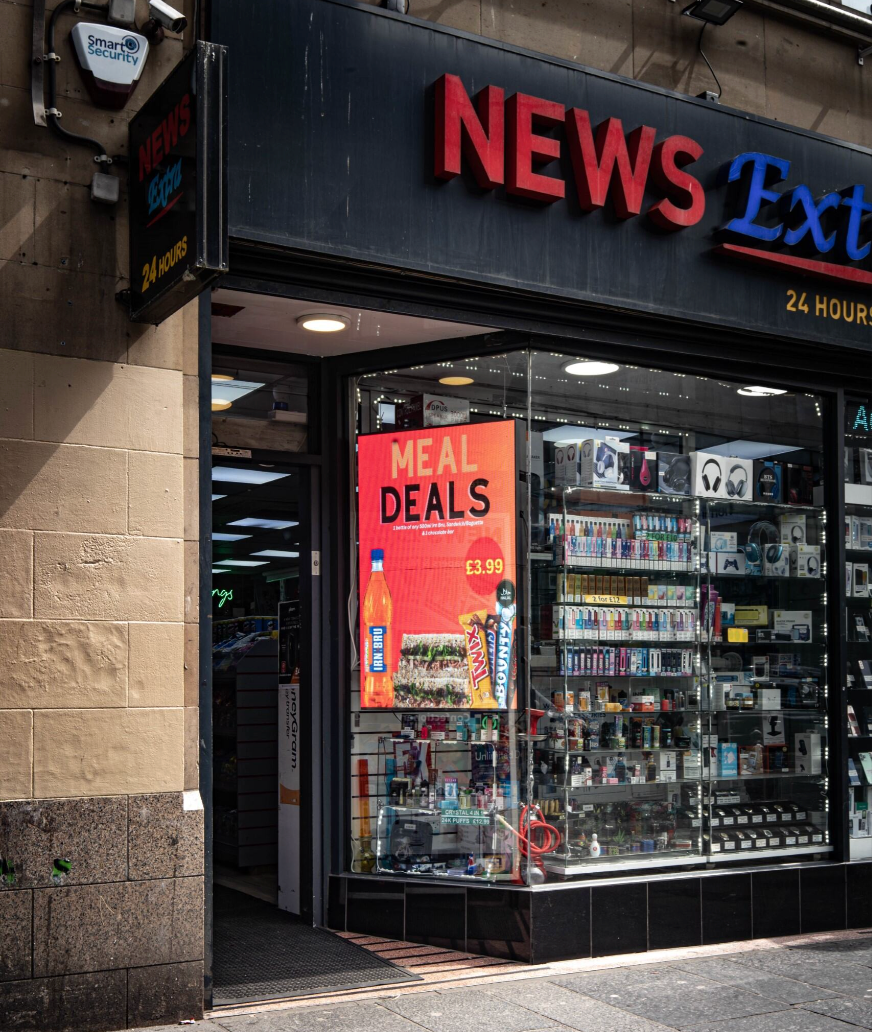
Digital signage screens are professional displays used to show digital content such as images, videos, advertisements, menus, announcements, presentations and live information.
Unlike traditional printed signage, digital displays allow businesses to change content quickly and remotely. Depending on the system, content can be scheduled for different times, locations or audiences.
Digital signage screens are commonly used in:
- Retail stores
- Restaurants and cafés
- Hotels
- Offices
- Schools and universities
- Healthcare facilities
- Gyms and leisure centres
- Transport hubs
- Shopping centres
- Reception areas
- Showrooms
- Public buildings
The right screen depends heavily on where and how it will be used.
1. Consider Where the Digital Signage Screen Will Be Installed
The first thing to consider when buying a digital signage display is its environment.
A screen installed inside a reception area has very different requirements from one positioned in a shop window or outdoors.
Think about:
- Indoor or outdoor installation
- Ambient lighting
- Direct sunlight
- Temperature
- Humidity
- Viewing distance
- Available wall space
- Customer traffic
- Operating hours
- Potential physical contact
For standard indoor environments, a conventional commercial display may be sufficient.
If the screen will be exposed to strong sunlight, extreme temperatures, moisture or dust, you may need a specialist outdoor display or protective enclosure.
Choosing the right environmental specification at the beginning can prevent expensive replacements later.
2. Choose the Right Screen Size
Screen size is one of the most obvious specifications, but bigger does not always mean better.
The ideal digital signage screen size depends on the viewing distance and the amount of information you need to display.
Common commercial display sizes include:
- 32-inch
- 43-inch
- 50-inch
- 55-inch
- 65-inch
- 75-inch
- 86-inch
- 98-inch and larger
A smaller display may work well at a reception desk or in a narrow corridor, while larger screens are often more suitable for retail environments, conference spaces and large public areas.
Before buying, measure the available installation area and consider how far viewers will be standing from the screen.
A useful question to ask is:
Can someone comfortably read the most important information from the furthest expected viewing position?
If the answer is no, increasing screen size or redesigning the content may be necessary.
3. Look at Screen Brightness
Brightness is one of the most important specifications when buying commercial digital signage screens.
Brightness is usually measured in nits.
A screen with insufficient brightness may look good in a showroom or office but become difficult to read when installed in a brightly lit retail environment.
For indoor digital signage, moderate brightness may be sufficient. Displays positioned near windows or in areas with significant ambient light may require higher brightness.
Outdoor screens have even greater requirements because direct sunlight can make ordinary displays extremely difficult to see.
When comparing displays, consider the actual installation environment rather than simply choosing the screen with the highest brightness rating.
4. Check the Resolution
Resolution determines how much detail a screen can display.
For modern digital signage, Full HD and 4K UHD displays are common options.
A 4K digital signage screen can be particularly useful when:
- Showing detailed product imagery
- Displaying small text
- Playing high-resolution video
- Using large screens
- Showing maps or diagrams
- Displaying presentations
- Creating premium advertising content
However, higher resolution is not automatically necessary for every installation.
For example, a relatively small screen displaying large promotional messages may not require 4K.
Consider the screen size, viewing distance and type of content before paying extra for a higher resolution.
5. Check the Screen's Operating Hours
One of the biggest differences between consumer televisions and commercial digital signage displays is their intended operating environment.
Ask how many hours per day the display is expected to run.
Your requirements might be:
- 6–8 hours per day
- 12 hours per day
- 16 hours per day
- 18 hours per day
- 24/7 operation
If your signage will run continuously, look for a display specifically designed for extended commercial operation.
A consumer TV may be suitable for occasional use, but businesses relying on signage throughout the working day should carefully check the manufacturer's commercial operating specifications and warranty conditions.
6. Check Landscape and Portrait Compatibility
Not all digital signage installations use landscape orientation.
Portrait displays are popular for:
- Retail advertising
- Digital menu boards
- Wayfinding
- Product promotions
- Directories
- Information displays
- Social media-style content
If you need to install your screen vertically, make sure the display supports portrait orientation and that your digital signage software can rotate content correctly.
This is an easy specification to overlook before purchasing.
7. Think About Connectivity
Connectivity determines how your screen receives content and communicates with your signage system.
Depending on the setup, you may need:
- HDMI
- DisplayPort
- USB
- Ethernet
- Wi-Fi
- Bluetooth
- RS-232
- Audio connections
For businesses using an external digital signage media player, HDMI is particularly important.
If the screen needs to be connected to a network, check whether wired Ethernet, Wi-Fi or both are available.
Wired networking may be preferable in some commercial environments because it can provide a stable connection without relying on wireless coverage.
8. Decide Whether You Need a Built-In Media Player
Some modern digital signage screens include built-in processing hardware.
This is often referred to as a System-on-Chip, or SoC, solution.
Instead of connecting a separate computer or media player, the signage software can run directly on compatible hardware within the display.
This can provide benefits such as:
- Fewer cables
- Cleaner installations
- Simplified hardware
- Easier deployment
- Potentially lower equipment costs
However, an external media player can provide greater flexibility.
It may be easier to upgrade or replace the player without replacing the display itself.
Before buying, check exactly which signage platforms the built-in system supports.
9. Make Sure the Screen Works With Your Digital Signage Software
The display itself is only one part of a complete digital signage solution.
Your digital signage software controls the content shown on your screens.
Depending on your requirements, you may need software that supports:
- Remote content management
- Scheduling
- Multiple screens
- Multiple locations
- Playlists
- User permissions
- Live data
- Emergency messaging
- Screen monitoring
- Content approval
- Automated updates
Before purchasing a display, confirm that the screen or media player is compatible with the CMS you intend to use.
This is especially important if you already have an existing digital signage network.
10. Consider Remote Management
Remote management can make a significant difference for businesses operating multiple digital signage screens.
Instead of visiting every display to change content, you can potentially manage screens from a central online platform.
Remote management can allow you to:
- Upload new content
- Change playlists
- Schedule campaigns
- Restart devices
- Monitor screen status
- Organise displays by location
- Troubleshoot problems
- Apply updates
For businesses with multiple locations, this can save considerable time and reduce the need for on-site maintenance.
11. Think About the Screen's Viewing Angle
Viewing angle can be important when customers will approach your signage from different directions.
A screen with a suitable viewing angle should remain clear and readable when viewed from the sides rather than only directly in front.
This matters particularly in:
- Retail stores
- Shopping centres
- Reception areas
- Corridors
- Public buildings
- Restaurants
Consider where people will be standing and walking before choosing your display.
12. Consider Anti-Glare Features
Reflections can significantly reduce the visibility of digital signage.
If your screen is near:
- Windows
- Glass doors
- Bright lighting
- Spotlights
- Highly reflective surfaces
then anti-glare technology may be worth considering.
A screen with strong brightness but significant reflections can still be difficult to read.
Look at the entire viewing environment rather than judging the display specification in isolation.
13. Check the Mounting Requirements
Before ordering a commercial display, check how it will be installed.
Most professional displays use VESA mounting standards, but the exact mounting pattern and weight vary between models.
You may need:
- Wall mounts
- Ceiling mounts
- Floor stands
- Portrait mounts
- Tilt brackets
- Freestanding kiosks
Always check the screen's dimensions and weight against your chosen mounting hardware.
You should also consider cable access and whether technicians will be able to reach the screen for maintenance.
14. Think About Touchscreen Digital Signage
Not every digital signage application requires touch functionality.
However, interactive displays can be useful when customers or visitors need to actively engage with the content.
Interactive digital signage can be used for:
- Product browsing
- Digital directories
- Self-service
- Wayfinding
- Information kiosks
- Educational applications
- Interactive presentations
If you do require touch functionality, consider the type of touchscreen technology, screen durability and the software that will run the interactive experience.
15. Check the Warranty
Warranty terms are particularly important when buying commercial signage equipment.
Before purchasing, check:
- Warranty length
- What components are covered
- Whether commercial use is included
- Repair or replacement terms
- On-site support availability
- Dead-pixel policy
- Technical support
- Return conditions
A cheaper display with limited commercial support may not represent better value than a more expensive professional display with a stronger warranty.
16. Consider Energy Consumption
Digital signage screens can operate for many hours every day, so energy efficiency should not be overlooked.
When comparing displays, consider:
- Typical power consumption
- Maximum power consumption
- Standby consumption
- Automatic power scheduling
- Energy-saving modes
If your business operates dozens of displays, relatively small differences in power consumption can become significant over time.
17. Plan for Future Expansion
Your digital signage requirements may grow.
You might start with one screen and eventually add displays across:
- Additional departments
- Other stores
- More offices
- Additional restaurants
- Different buildings
- Multiple cities
When choosing your system, consider whether it can scale.
A suitable digital signage CMS should ideally allow you to add screens without having to replace your entire infrastructure.
Thinking about scalability from the beginning can make future expansion much easier.
18. Consider Security
Network-connected digital signage should be treated as part of your business's technology infrastructure.
Look for solutions that support appropriate security measures such as:
- Secure user accounts
- Role-based permissions
- Software updates
- Network security
- Device authentication
- Remote monitoring
- Secure content management
If your screens connect to a corporate network, involve your IT team before deployment.
This is particularly important for larger organisations where signage devices may need to comply with internal cybersecurity policies.
19. Think About Content Before Buying the Screen
Your content should influence your hardware choice.
For example, a restaurant displaying large menu items may have different requirements from a luxury retailer showing high-resolution product videos.
Consider whether your content will primarily contain:
- Text
- Images
- Video
- Animations
- Live dashboards
- Web pages
- Social media
- Product information
- Maps
- Interactive applications
If you plan to show detailed video or high-resolution imagery, make sure the display and media player can handle the required formats and resolutions.
20. Don't Forget Audio
Some digital signage installations are visual only.
Others may require audio for:
- Advertisements
- Promotional videos
- Training
- Announcements
- Entertainment
- Interactive applications
If audio is important, check whether the display includes speakers or whether you need an external audio system.
In noisy environments, visual communication may still be more effective than relying on built-in speakers.
21. Compare Total Cost, Not Just Screen Price
When searching for digital signage screens for sale, it is tempting to compare only the cost of the display.
However, the complete project may include:
Screen + media player + software + mounting + installation + networking + content creation + support
You may also have recurring costs such as software licences and maintenance.
A slightly more expensive professional display can provide better value if it offers greater reliability, easier management and longer commercial support.
Always consider the total cost of ownership before making a decision.
Digital Signage Screens Buying Checklist
Before purchasing, ask yourself:
- What environment will the screen be installed in?
- How large does the display need to be?
- How far away will viewers stand?
- How bright does the screen need to be?
- Will it operate for extended hours?
- Does it need to work in portrait orientation?
- Do I need 4K resolution?
- Do I need a built-in media player?
- Which digital signage software will I use?
- Does the hardware support my chosen CMS?
- Will I need remote management?
- How will the screen be mounted?
- Does it need touchscreen functionality?
- Does it require Wi-Fi or Ethernet?
- What warranty is included?
- What happens if the screen fails?
- Can I add more screens later?
- What is the total cost of ownership?
Answering these questions before purchasing will make it much easier to narrow down your options.
Common Mistakes When Buying Digital Signage Screens
Choosing Based Only on Price
The cheapest screen is rarely the best choice for a commercial installation.
Consider reliability, warranty, operating hours and software compatibility as well as the upfront cost.
Buying Without Checking Brightness
A display that looks excellent indoors may struggle near a window.
Always assess the lighting conditions where the screen will actually be installed.
Forgetting About Software
A high-quality screen is of limited use if your signage platform cannot communicate with it properly.
Choose your software and hardware as part of the same system.
Ignoring Future Expansion
If you expect your signage network to grow, choose a platform that can support additional screens.
Using the Wrong Mount
Check the display's VESA pattern, dimensions and weight before purchasing mounting hardware.
Final Thoughts: What Should You Look for When Buying Digital Signage Screens?
The best digital signage screen is not necessarily the largest, brightest or most expensive model.
It is the display that fits your environment, content, operating schedule and long-term business requirements.
Before buying, pay particular attention to screen size, brightness, resolution, operating hours, connectivity, viewing angle, orientation, software compatibility, mounting requirements and warranty support.
For a single indoor display, your requirements may be relatively straightforward. For a multi-location digital signage network, however, it is worth considering the entire ecosystem, including commercial displays, media players, content management software, networking and remote monitoring.
By evaluating these factors before you buy, you can choose commercial digital signage screens that deliver reliable performance and provide a strong return on investment over the long term.